Desktop hardware development platform

Tantalum IDE

A local-first Electron IDE for Arduino sketches, board management, firmware builds, built-in Git source control, over-the-air deployment, source snapshot recovery, workspace cloud sync, and an integrated agentic coding assistant.

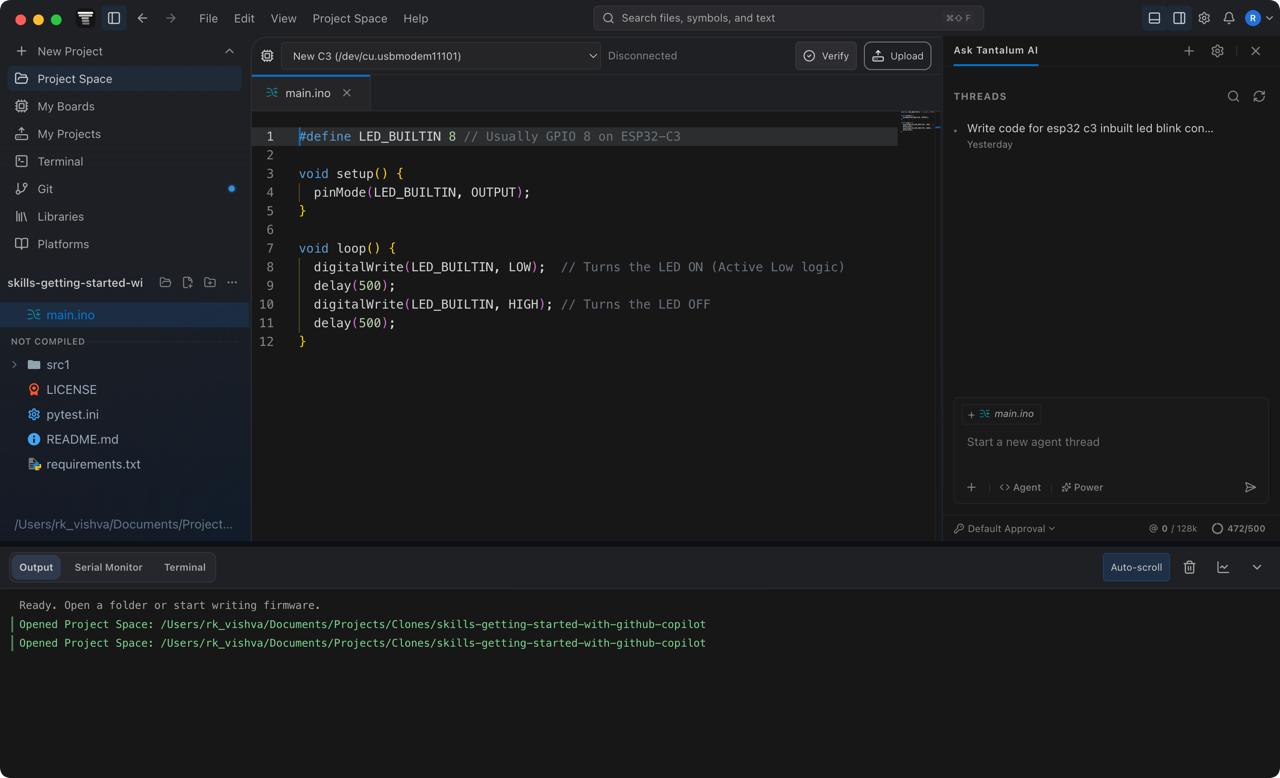
Tantalum IDE — workspace.ino
Tantalum IDE workspace and Monaco editor interface

Overview

Tantalum in one page

Tantalum IDE is the desktop foundation of a distributed hardware deployment ecosystem. It keeps day-to-day editing, Git source control, and compilation local, connecting to Appwrite, Gitea, and MQTT only when a project requires secure authentication, backup, OTA delivery, live telemetry, or AI model access.

Tantalum IDE

Electron main process, React renderer, Monaco editor, Arduino CLI orchestration, serial tooling, local board profiles, built-in Git source control, OTA release creation, and AI agent runtime. The core engine that runs on your local machine.

Tantalum Web

Cloud portal for authentication, board administration, firmware history, agent settings, entitlements, support, and administrative operations.

Tantalum Mobile

Companion provisioning app for sending WiFi credentials to devices through BLE or SoftAP using board proof-of-possession, without exposing WiFi secrets to the cloud.

Core Features

What the IDE includes

Arduino editing and builds

Monaco-based sketch editing with Arduino CLI compile/upload, board packages, library installation, streamed build output, and compilation cancellation support.

Auto board detection

Combines Arduino CLI board metadata, USB serial metadata, stable hardware fingerprints, ESP chip probing, and optional AI fallback for ambiguous boards.

Local board profiles

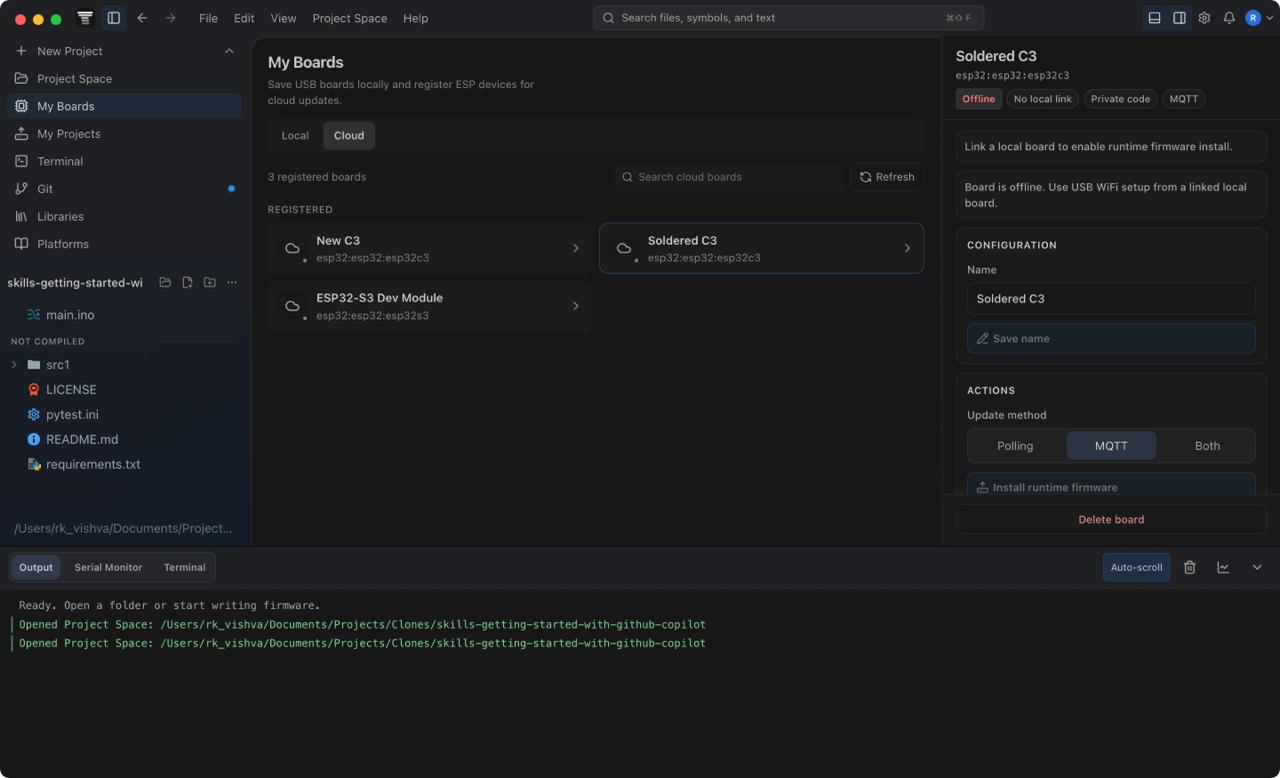
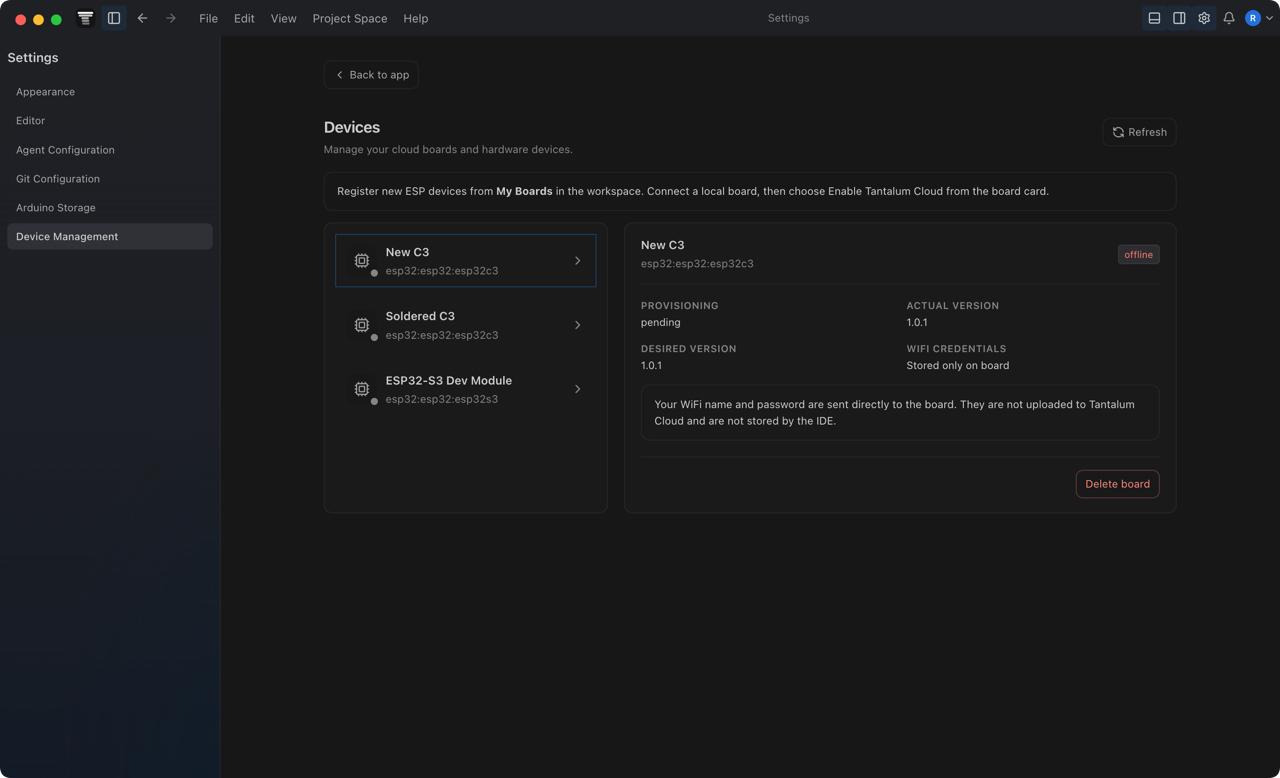
Saves FQBN, port, manufacturer, VID/PID, serial identity, cloud link, OTA mode, and source-code visibility so physical boards are instantly recognized upon reconnection.

Tantalum runtime

Injects runtime macros and TantalumCloudRuntime.h into temporary builds for heartbeat, OTA polling, MQTT commands, TLS, provisioning, and telemetry.

OTA firmware delivery

Builds locally, uploads firmware to Appwrite Storage, records metadata and checksums, then queues deployment through polling, MQTT, or both.

View Code recovery

Restores exact source from Tantalum source snapshots by scanning firmware for an embedded marker and verifying cloud snapshot checksums.

Project cloud sync

Uses a shadow Git repository and Gitea remote so workspace backup does not mutate the user's own active Git repository.

Built-in Git source control

Reviews changes, shows diffs, stages files, commits, fetches, pulls, pushes, manages branches, initializes repositories, and publishes to GitHub or GitLab.

Agentic AI assistant

Routes prompts through the Tantalum agent runtime, OpenCode SDK, Appwrite gateway, safe workspace context, restore points, and Arduino/Git tool execution.

Serial monitor and plotter

Reads serial output, supports numeric plot parsing, and checks for serial-port blockers before uploads, provisioning, or board-code readback.

Version Control

Built-in Git support

Tantalum's source-control panel works directly on the active Project Space repository. This is separate from Project Cloud Sync: the Git panel uses the user's real .git folder, while cloud sync uses a shadow repository for managed backup.

Working tree status and diffs

main.js runs git status --porcelain=v2 --branch and separates staged, unstaged, untracked, and conflicted files. Diff views pair HEAD, staged objects, and workspace file content so users can inspect changes before committing.

Source-control actions

The UI supports stage, unstage, discard, commit, commit-and-push, fetch, fast-forward pull, push, branch checkout, and branch creation through the guarded window.tantalum.git preload API.

Repository setup and publishing

Non-Git Project Spaces can be initialized from the IDE. Publishing creates a GitHub or GitLab repository, creates an initial commit if needed, sets origin, and pushes the active branch without writing provider tokens into the remote URL.

Commit history graph

Tantalum reads git log --all --topo-order --decorate=short --numstat and renders refs, branch lanes, author metadata, avatars, ahead/behind state, and file-change statistics inside the Git workspace.

Settings and credentials

Git author name and email are written through global Git config. GitHub/GitLab usernames, default provider choice, and personal access tokens live in the desktop secret store.

Safety boundaries

Git commands run with terminal prompts disabled, file paths are normalized inside the active Project Space, destructive discards require confirmation, and unsafe repository ownership can be repaired through an explicit safe.directory action.

How it works

System architecture

Tantalum keeps privileged operations in Electron main, exposes a narrow IPC surface through preload, and lets the React renderer focus purely on user interface presentation.

UI Tier

React Renderer

Vite React application running Monaco editor & dashboards

IPC Preload Bridge
Core Tier

Electron Main Process

Orchestrator, filesystem access, subprocesses & remote clients

Local System

Arduino CLI, Git CLI, Serial Ports, USB/BLE devices

Cloud Layer

Appwrite DB, Gitea Git, Mosquitto MQTT

IoT Firmware

Physical Boards (Tantalum Runtime)

Desktop process split

main.js owns file system access, Arduino CLI processes, serial ports, Appwrite API calls, Git CLI operations, cloud sync, toolchain locks, notifications, and agent orchestration. The renderer communicates through explicit preload APIs such as toolchain.compile, toolchain.detectLocalBoards, git.getStatus, and toolchain.restoreBoardCodeSnapshot.

Board detection pipeline

src/services/localBoardService.js merges arduino-cli board list JSON with serialport results, normalizes physical ports, scores confidence, probes ESP chips with esptool chip_id, then optionally calls the board-detection function for an AI-assisted FQBN suggestion.

Runtime build injection

arduinoHandler.js creates a temporary sketch, wraps user setup() and loop(), injects runtime macros, copies TantalumCloudRuntime.h, installs required libraries, and verifies source markers are still present in compiled artifacts before upload.

Source snapshot recovery

Before upload, source files are zipped with tantalum-source-manifest.json. The build embeds TANTALUM_SOURCE_SNAPSHOT_V1::<markerId>::<checksum>::END. View Code reads firmware, finds that marker, downloads the matching snapshot, verifies the checksum, validates identity, and restores files.

Latest two snapshots

Marker documents start as pending. After a successful flash, the new marker becomes current, the previous current is demoted to previous, and older documents in the same retention group are pruned.

OTA command path

board-admin updates desired firmware state and can publish an HMAC-signed MQTT command. device-gateway validates board tokens, returns signed OTA commands, records heartbeats, and accepts OTA result telemetry.

Cloud sync

cloudSyncService scans with .tantalumignore, copies allowed files into a shadow repo, commits, rebases against Gitea, pushes, and applies remote tracked files back into the Project Space. Existing Git projects are scanned read-only.

Direct Git support

Built-in source control uses the active workspace repository rather than the cloud-sync shadow repo. IPC handlers wrap local Git commands for status, diffs, commits, remotes, branches, history, initialization, publishing, and safe-directory repair.

AI gateway

agent-gateway resolves managed or custom OpenAI-compatible credentials, validates public HTTPS base URLs, applies output policy, retries around provider parameter incompatibilities, debits credits, and writes usage ledger entries.

Workflow Map

Common paths through the system

01

Detect and save a board

Auto detect reads local board metadata, fills candidate FQBN and port details, and saves a profile keyed by trusted hardware identity.

02

Enable cloud runtime

board-admin creates a cloud board and returns one-time secrets. The desktop injects those secrets into runtime firmware and flashes it over USB.

03

Provision WiFi

USB provisioning sends an HMAC-signed JSON command directly over serial. BLE and SoftAP provisioning use the runtime proof-of-possession value.

04

Create an OTA release

The IDE compiles locally, embeds a source marker, saves a source snapshot, uploads the firmware artifact, creates a firmware document, and queues deployment.

05

Restore source with View Code

The IDE reads firmware, scans for the marker, lists the current and previous matching snapshots, then restores the chosen zip into the current or a new Project Space.

06

Commit through built-in Git

Source control reads the active repository, shows changed files and diffs, stages selected paths, commits locally, and can fetch, pull, push, or create branches.

07

Sync the workspace

Cloud sync snapshots selected workspace files into a shadow Git repo, pushes to Gitea, and writes sync events for audit and conflict handling.

Deployment

Self-hosting guide

The default self-hosted ecosystem runs Appwrite for auth, database, storage, functions, and hosting; Mosquitto for persistent MQTT board commands; and Gitea for cloud workspace sync. Built-in Git source control can use any normal Git remote; Gitea is needed only for Tantalum-managed workspace cloud sync.

Detailed Azure Runbook

This repository includes a step-by-step Appwrite VM deployment runbook at Azure Self-Hosted Appwrite Runbook. Use the guide below as the project-wide architectural map, then follow the runbook for exact Azure command execution.

Step 1

Appwrite VPS

Host Appwrite on a VM with persistent data under /srv/tantalum. The provided Azure scripts create the VM, data disk, Appwrite host scripts, backups, health checks, and vertical resize path.

PowerShell
pwsh ./infra/azure/deploy-appwrite-vm.ps1 \
  -SshPublicKeyPath "$HOME/.ssh/tantalum_azure_ed25519.pub" \
  -DataDiskSizeGb 256
Step 2

Appwrite schema and functions

Push database tables, storage buckets, and serverless functions from appwrite.config.json. Keep the database ID 697b8f660033fffde4be unless you intentionally migrate all config.

Appwrite CLI
appwrite push tables
appwrite push buckets
appwrite push functions
Step 3

Function secrets

Generate Key Encryption Keys (KEKs) for encrypted API keys and board command secrets. Configure collection, bucket, endpoint, MQTT, and credit variables per function.

Node.js
node -e "console.log(require('node:crypto').randomBytes(32).toString('base64'))"
Step 4

MQTT VPS

Run Mosquitto over TLS on port 8883. Appwrite publishes as a publisher user, boards subscribe as a device user, and ACLs restrict access to tantalum/boards/+/+/cmd.

Bash
sudo apt install -y mosquitto mosquitto-clients openssl
sudo ufw allow 8883/tcp
Step 5

Gitea VPS

Deploy Gitea to host the remote workspace synchronization. Tantalum desktop processes authenticate with generated SSH keys and sync shadow Git repositories without touching the user's active history.

PowerShell
pwsh ./infra/azure/deploy-gitea-vm.ps1
pwsh ./infra/azure/configure-gitea.ps1
Step 6

Seed AI and utility config

Seed managed model keys, custom credential defaults, output styles, and utility AI models for board detection.

npm
npm run selfhost:seed
npm run migrate:api-key-envelopes

Required Functions

  • board-admin: board creation, token rotation, deployment, MQTT commands.
  • device-gateway: heartbeats, update checks, OTA result telemetry.
  • agent-settings: agent preference and credential management.
  • agent-gateway: managed/custom model proxy and credit ledger.
  • board-detection: AI-assisted board FQBN detection.
  • project-sync: Gitea project creation, link, and sync events.
  • desktop-auth: desktop login handoff.
  • web-admin: administrative operations.

Core Collections

  • boards, firmwares, board_source_snapshots, sketches.
  • agent_* settings, credentials, credits, usage, threads, and async results.
  • utility_ai_model_pool, board_detection_cache, board_detection_usage.
  • cloud_projects, cloud_project_devices, cloud_project_sync_events.
  • desktop_auth_grants, user_entitlements, support and admin audit tables.

Storage Buckets

  • firmware_bucket: .bin, .hex, and .uf2 firmware binaries.
  • firmware_source_bucket: zipped source code snapshots for marker-backed snapshot restore.

Validation Scripts

  • npm run smoke:desktop-auth
  • npm run smoke:device-gateway-ota-url
  • npm run smoke:device-gateway-telemetry
  • npm run smoke:firmware-checksum
  • npm run smoke:board-code
  • npm run smoke:cloud-sync
  • npm run smoke:opencode

Security Model

How secrets and permissions are handled

Board credentials

Cloud boards store token hashes, token previews, MQTT topic suffixes, and encrypted command secret envelopes. The raw API token and command secret are returned only when creating or rotating a board.

WiFi credentials

WiFi SSID and password are sent directly to the board over USB, BLE, or SoftAP. They are never uploaded to Appwrite database tables and are not stored locally by the desktop process.

AI provider keys

Managed and custom provider keys are stored as strong KEK-encrypted envelopes. The desktop does not require access to raw developer keys when routing through the Appwrite agent gateway.

Source snapshots

Firmware source snapshots are private by default. Public code visibility grants read access to authenticated ecosystem users while keeping update/delete permissions scoped exclusively to the owner.

Git provider credentials

GitHub and GitLab publishing tokens are kept in the desktop secret store. Publishing pushes with a temporary authorization header and does not save provider tokens into repository remote URLs.

Agent workspace access

Agent context excludes secrets, keys, credentials, .env files, .git data, and agent artifacts. Restore points can reverse agent file edits inside the active Project Space.

MQTT command integrity

MQTT commands include action, deployment ID, nonce, timestamp, and HMAC signature. Boards reject stale, replayed, or incorrectly signed incoming commands.

Local Development

Build and test the IDE

Prerequisites

  • Node.js 18 or newer
  • npm 9 or newer
  • Git in PATH for source control and repository publishing
  • Arduino CLI in PATH or bundled under resources/
  • Appwrite project configuration when testing cloud features

Repository structure map

  • main.js: Electron main, IPC handlers, remote calls, notifications
  • preload.js: Secure preload bridge interface definition
  • renderer-react/: Vite-based React renderer interface
  • arduinoHandler.js: Arduino CLI runtime builder pipeline
  • src/services/: Board, snapshot restore, cloud sync services
  • renderer-react/src/components/GitWorkspace.tsx: Git source-control UI
  • src/agent/: Agent routing tools & OpenCode execution
  • functions/: Self-hosted Appwrite serverless functions
  • resources/firmware/: Tantalum runtime IoT firmware source
bash — ~/projects/tantalum-ide
$ npm install
added 842 packages, and audited 843 packages in 4s
$ npm run dev
Starting Vite + Electron hot reload environment...
$ npm run build:renderer
vite v4.3.9 building for production...
✓ 482 modules transformed.
dist/renderer/index.html 0.45 kB │ gzip: 0.30 kB
dist/renderer/assets/index.js 284.11 kB
$ npm run dist
electron-builder v24.4.0 building Tantalum IDE v1.0.0...
Packaging macOS App...
Building DMG package...
DMG completed successfully.